在上一篇文章中,我们介绍了AST的Create。在这篇文章中,我们接着来介绍AST的Retrieve。
针对语法树节点的查询(Retrieve)操作通常伴随着Update和Remove(这两种方法见下一篇文章)。这里介绍两种方式:直接访问和traverse。
本文中所有对AST的操作均基于以下这一段代码
const babylon = require('babylon')
const t = require('@babel/types')
const generate = require('@babel/generator').default
const traverse = require('@babel/traverse').default

const code = `
export default {
  data() {
    return {
      message: 'hello vue',
      count: 0
    }
  },
  methods: {
    add() {
      ++this.count
    },
    minus() {
      --this.count
    }
  }
}
`

const ast = babylon.parse(code, {
  sourceType: 'module',
  plugins: ['flow']
})
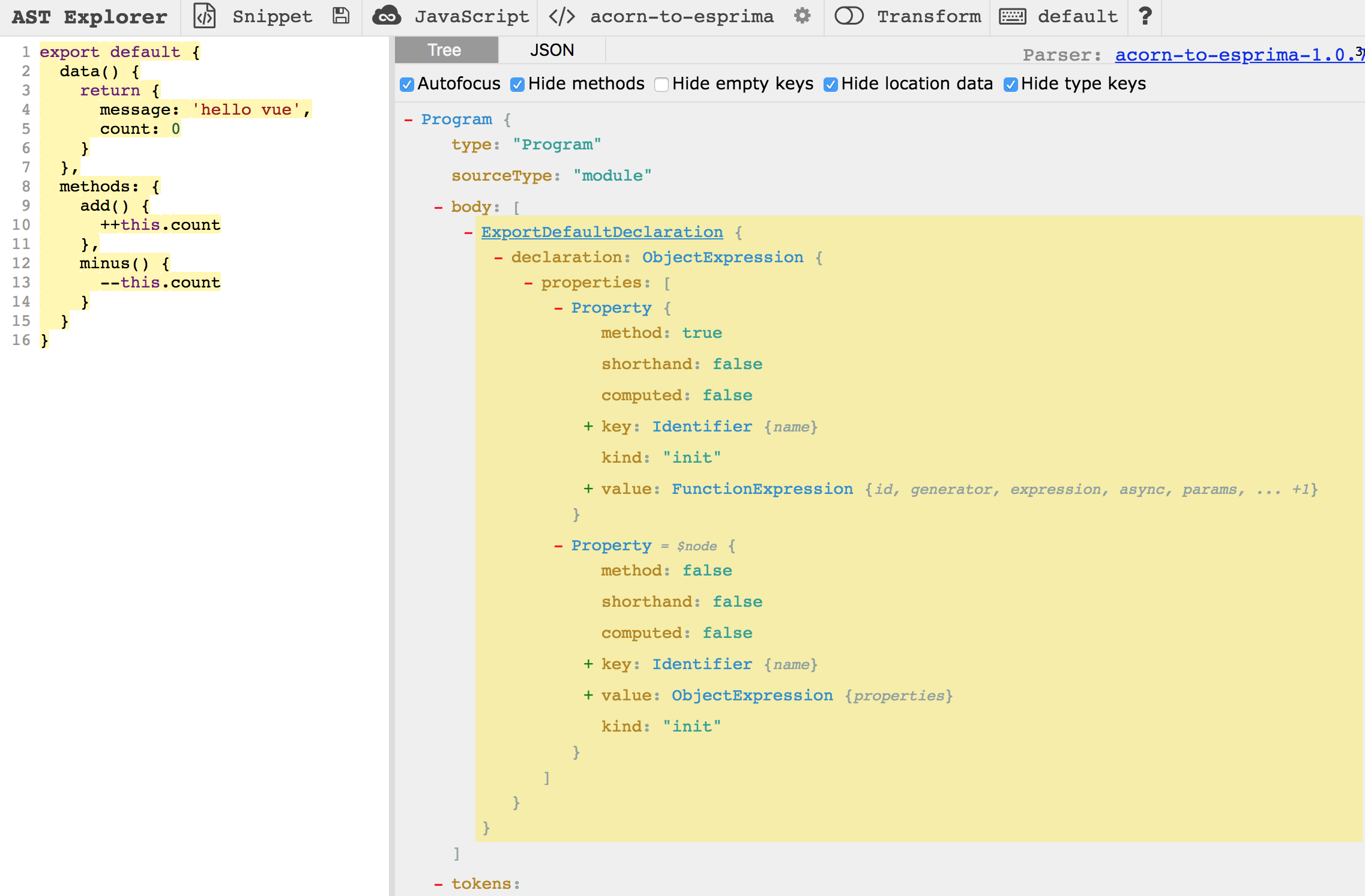
对应的AST explorer的表示如下图所示,大家可以自行拷贝过去查看:
直接访问
如上图中,有很多节点Node,如需要获取ExportDefaultDeclaration下的data函数,直接访问的方式如下:
const dataProperty = ast.program.body[0].declaration.properties[0]
console.log(dataProperty)
程序输出:
Node {
  type: 'ObjectMethod',
  start: 20,
  end: 94,
  loc:
   SourceLocation {
     start: Position { line: 3, column: 2 },
     end: Position { line: 8, column: 3 } },
  method: true,
  shorthand: false,
  computed: false,
  key:
   Node {
     type: 'Identifier',
     start: 20,
     end: 24,
     loc: SourceLocation { start: [Object], end: [Object], identifierName: 'data' },
     name: 'data' },
  kind: 'method',
  id: null,
  generator: false,
  expression: false,
  async: false,
  params: [],
  body:
   Node {
     type: 'BlockStatement',
     start: 27,
     end: 94,
     loc: SourceLocation { start: [Object], end: [Object] },
     body: [ [Object] ],
     directives: [] } }
这种直接访问的方式可以用于固定程序结构下的节点访问,当然也可以使用遍历树的方式来访问每个Node。
这里插播一个Update操作,把data函数修改为mydata:
const dataProperty = ast.program.body[0].declaration.properties[0]
dataProperty.key.name = 'mydata'

const output = generate(ast, {}, code)
console.log(output.code)
程序输出:
export default {
  mydata() {
    return {
      message: 'hello vue',
      count: 0
    };
  },

  methods: {
    add() {
      ++this.count;
    },

    minus() {
      --this.count;
    }

  }
};
使用Traverse访问
使用直接访问Node的方式,在简单场景下比较好用。可是对于一些复杂场景,存在以下几个问题:
- 需要处理某一类型的
Node,比如ThisExpression、ArrowFunctionExpression等,这时候我们可能需要多次遍历AST才能完成操作 - 到达特定
Node后,要访问他的parent、sibling时,不方便,但是这个也很常用
@babel/traverse库可以很好的解决这一问题。traverse的基本用法如下:
// 该代码打印所有 node.type。 可以使用`path.type`,可以使用`path.node.type`
let space = 0

traverse(ast, {
  enter(path) {
    console.log(new Array(space).fill(' ').join(''), '>', path.node.type)
    space += 2
  },
  exit(path) {
    space -= 2
    // console.log(new Array(space).fill(' ').join(''), '<', path.type)
  }
})
程序输出:
 > Program
   > ExportDefaultDeclaration
     > ObjectExpression
       > ObjectMethod
         > Identifier
         > BlockStatement
           > ReturnStatement
             > ObjectExpression
               > ObjectProperty
                 > Identifier
                 > StringLiteral
               > ObjectProperty
                 > Identifier
                 > NumericLiteral
       > ObjectProperty
         > Identifier
         > ObjectExpression
           > ObjectMethod
             > Identifier
             > BlockStatement
               > ExpressionStatement
                 > UpdateExpression
                   > MemberExpression
                     > ThisExpression
                     > Identifier
           > ObjectMethod
             > Identifier
             > BlockStatement
               > ExpressionStatement
                 > UpdateExpression
                   > MemberExpression
                     > ThisExpression
                     > Identifier
traverse引入了一个NodePath的概念,通过NodePath的API可以方便的访问父子、兄弟节点。
注意: 上述代码打印出的node.type和AST explorer中的type并不完全一致。实际在使用traverse时,需要以上述打印出的node.type为准。如data函数,在AST explorer中的type为Property,但其实际的type为ObjectMethod。这个大家一定要注意哦,因为在我们后面的实际代码中也有用到。
仍以上述的访问data函数为例,traverse的写法如下:
traverse(ast, {
  ObjectMethod(path) {
    // 1
    if (
      t.isIdentifier(path.node.key, {
        name: 'data'
      })
    ) {
      console.log(path.node)
    }

    // 2
    if (path.node.key.name === 'data') {
      console.log(path.node)
    }
  }
})
上面两种判断Node的方法都可以,哪个更好一些,我也没有研究。
通过travase获取到的是NodePath,NodePath.node等价于直接访问获取的Node节点,可以进行需要的操作。
以下是一些从babel-handbook中看到的NodePath的API,写的一些测试代码,大家可以参考看下,都是比较常用的:
parent
traverse(ast, {
  ObjectMethod(path) {
    if (path.node.key.name === 'data') {
      const parent = path.parent
      console.log(parent.type)    // output: ObjectExpression
    }
  }
})
findParent
traverse(ast, {
  ObjectMethod(path) {
    if (path.node.key.name === 'data') {
      const parent = path.findParent(p => p.isExportDefaultDeclaration())
      console.log(parent.type)
    }
  }
})
find 从Node节点找起
traverse(ast, {
  ObjectMethod(path) {
    if (path.node.key.name === 'data') {
      const parent = path.find(p => p.isObjectMethod())
      console.log(parent.type) // output: ObjectMethod
    }
  }
})
container 没太搞清楚,访问的NodePath如果是在array中的时候比较有用
traverse(ast, {
  ObjectMethod(path) {
    if (path.node.key.name === 'data') {
      const container = path.container
      console.log(container) // output: [...]
    }
  }
})
getSibling 根据index获取兄弟节点
traverse(ast, {
  ObjectMethod(path) {
    if (path.node.key.name === 'data') {
      const sibling0 = path.getSibling(0)
      console.log(sibling0 === path) // true
      const sibling1 = path.getSibling(path.key + 1)
      console.log(sibling1.node.key.name) // methods
    }
  }
})
skip 最后介绍一下skip,执行之后,就不会在对叶节点进行遍历
traverse(ast, {
  enter(path) {
    console.log(path.type)
    path.skip()
  }
})
程序输出根节点Program后结束。
